Original Lockup

The primary mark

Shield icon alongside the full "OneFirewall Alliance" logotype in original brand colours. Use this by default unless space or context calls for the Classic or Icon-only marks below.


Original — Transparent (Large)
1400×420px38.2 KBTransparent
High-resolution horizontal logo on a transparent background. Ideal for websites and print. Download ↓
Original — Transparent (Medium)
405×120px9.4 KBTransparent
Medium-size horizontal logo, transparent background. Good for headers and nav bars. Download ↓
Original — Transparent (Small)
255×75px6.8 KBTransparent
Compact horizontal logo for smaller UI elements and email footers. Download ↓
Original — Transparent (Micro)
125×37px4.3 KBTransparent
Smallest original variant for badges, sidebars, and tight UI spaces. Download ↓
Original — Negative (Large)
1400×420px55.7 KBWhite on Dark
Inverted/white-on-dark variant for dark backgrounds, banners, and slide decks. Download ↓
Original — White (Large)
1400×420px55.4 KBWhite
White-background variant for light-themed documents, reports, and print materials. Download ↓
Classic Lockup

Condensed composition

A slightly condensed horizontal lockup, suited to header bars and co-branding strips where the Original mark runs too wide.


Classic — Transparent (Large)
1500×420px75.6 KBTransparent
Large classic logo with transparent background for flexible placement on any surface. Download ↓
Classic — Transparent (Medium)
420×120px10.8 KBTransparent
Medium classic logo for navigation bars, press kits, and partner pages. Download ↓
Classic — Transparent (Small)
260×75px7.5 KBTransparent
Small classic variant for inline use in blog posts, footers, and mobile headers. Download ↓
Classic — Negative (Large)
1500×420px50.2 KBWhite on Dark
Negative classic lockup for dark-themed presentations, banners, and marketing materials. Download ↓
Full Lockup

Extended composition

The widest lockup variant, for banner placements and title slides where horizontal space isn't a constraint.

Full — Transparent (Large)
1900×420px76.7 KBTransparent
The widest brand asset, transparent background — ideal for hero banners and conference slides. Download ↓
Full — Transparent (Medium)
560×120px11.0 KBTransparent
Medium full logo with transparency for website headers and email signatures. Download ↓
Full — Negative (Large)
1900×420px77.1 KBWhite on Dark
Full-width negative lockup for dark-themed designs and high-contrast materials. Download ↓
Full — White (Large)
1900×420px51.3 KBWhite
Full-width white-background version for print documents, PDFs, and light-themed assets. Download ↓
Icon Only

The shield mark, standalone

The shield symbol without the logotype — for favicons, app icons, social avatars, and tight UI spaces.

Icon — Transparent (Large)
840×780px38.4 KBTransparent
High-resolution shield icon on transparent background. Best for social media profile pictures and large app icons. Download ↓
Icon — Transparent (Medium)
470×420px15.1 KBTransparent
Medium-resolution icon for inline use in partner pages, integration docs, and blog posts. Download ↓
Icon — Transparent (Small)
86×75px4.2 KBTransparent
Small icon for compact UI elements, comment threads, and inline brand marks. Download ↓
Icon — Transparent (Favicon)
32×32px3.0 KBTransparent
Favicon-size icon for browser tabs, bookmark icons, and small touch targets. Download ↓
Icon — Negative (Large)
840×780px28.5 KBWhite on Dark
High-resolution negative icon for dark presentations, swag, and merchandise designs. Download ↓
Fill Variants

Solid white, for overlay use

Fully filled-white treatments of the mark, for compositing over photography, video, and dark brand surfaces.
Logo Fill — White
Logo Fill — White
233.3 KBWhite on Dark
Full filled-white version of the complete logo. Designed for overlaying on dark-coloured brand backgrounds. Download ↓
Logo Icon — White
Logo Icon — White
163.2 KBWhite on Dark
White-only shield icon for dark background templates, CSS filter workflows, and monochrome print. Download ↓
Product Logos

Every product, its own mark

Official product and service logos across the OneFirewall Alliance ecosystem.

ClosedVPN — Logo
ClosedVPN — Logo
PNGTransparent
Official logo for the ClosedVPN product. Download ↓
AI Gateway — Logo
AI Gateway — Logo
PNGTransparent
Official logo for the OneFirewall AI Gateway product. Download ↓
OFA Mobile — Logo
OFA Mobile — Logo
PNGTransparent
Official logo for the OFA Mobile application. Download ↓
OneDevice — Logo
OneDevice — Logo
PNGTransparent
Official logo for the OneDevice product. Download ↓
Secure DNS — Logo
Secure DNS — Logo
PNGTransparent
Official logo for the OneFirewall Secure DNS service. Download ↓
Secure Channel — Logo
PNGTransparent
Official logo for the OneFirewall Secure Channel (SOC) service. Download ↓
Vulnix0 — Logo
Vulnix0 — Logo
PNGTransparent
Official logo for the Vulnix0 vulnerability intelligence product. Download ↓
WAF — Logo
WAF — Logo
PNGTransparent
Official logo for the OneFirewall Web Application Firewall. Download ↓
WCF Agent — Logo
WCF Agent — Logo
PNGTransparent
Official logo for the WCF Agent integration component. Download ↓
Product Icons

Compact icons, for grids and integration lists

Square product icons for cards, grids, integrations lists, and UI components.

Cyber Threat Intelligence — Icon
PNGTransparent
Compact icon for the OFA Cyber Threat Intelligence product. Download ↓
WCF Agent — Icon
WCF Agent — Icon
PNGTransparent
Compact icon for the WCF Agent integration component. Download ↓
OneDevice Firewall — Icon
PNGTransparent
Compact icon for the OneDevice hardware firewall. Download ↓
Web Application Firewall — Icon
PNGTransparent
Compact icon for the OneFirewall Web Application Firewall. Download ↓
Secure DNS — Icon
Secure DNS — Icon
PNGTransparent
Compact icon for the OFA Secure DNS service. Download ↓
ClosedVPN — Icon
ClosedVPN — Icon
PNGTransparent
Compact icon for the ClosedVPN product. Download ↓
Secure Channel — Icon
PNGTransparent
Compact icon for the Secure Channel communications product. Download ↓
OFA Mobile — Icon
OFA Mobile — Icon
PNGTransparent
Compact icon for the OFA Mobile application. Download ↓
AI Gateway — Icon
AI Gateway — Icon
PNGTransparent
Compact icon for the OneFirewall AI Gateway product. Download ↓
AquilaX Security — Icon
PNGTransparent
Compact icon for the AquilaX AI-powered security scanning platform. Download ↓
Vulnix0 — Icon
Vulnix0 — Icon
PNGTransparent
Compact icon for the Vulnix0 vulnerability management product. Download ↓
Technical Diagrams

Architecture, in scalable SVG

Official architecture and presentation diagrams — embed directly in documentation or slide decks, resolution-independent at any size.

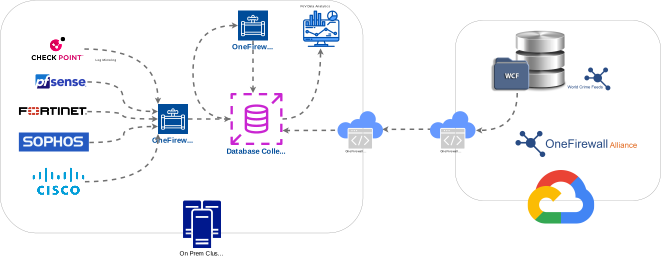
OFA Infrastructure Architecture
1920×1531px2.0 MBSVG
End-to-end network topology — WAF, Firewall, IDS/IPS, DNS, VPN, SOC, and CTI layers with animated flow indicators. Download ↓
OFA Proof of Value — Presentation
661×257px576 KBSVG
Presentation-ready diagram summarising the Proof of Value process. Download ↓
Usage & Attribution

How to credit OneFirewall Alliance

<a href="https://onefirewall.com" target="_blank" rel="noopener">Powered by OneFirewall Alliance</a>

Suggested attribution HTML

Do not use the logo in a way that suggests endorsement without prior written agreement. For product-specific logos (WCF Agent, OneDevice, WAF, Secure DNS, ClosedVPN, OFA Mobile) or a full press kit, contact our team.