Enterprise-Grade CTI Enforcement
Inside Forcepoint NGFW
The WCF Agent bridges OneFirewall Alliance threat intelligence directly into your Forcepoint Next Generation Firewall — automated blocklists, real-time Crime Score enforcement, and STIX 2.1 indicator sync with zero manual intervention.
How the WCF Agent Works
The agent runs as a persistent daemon on any Linux host within your network, continuously polling OFA CTI and translating indicators into Forcepoint-native policy objects.
Integration Architecture
CTI Retrieval
The daemon authenticates to the OFA platform via Bearer token and retrieves the latest IPv4 threat feed filtered by Crime Score threshold. Supports incremental pulls using the since timestamp parameter to minimize API load.
Object Translation
Each qualifying IPv4 indicator is converted into a Forcepoint SMC Network Element object with name, description, and associated metadata tags populated from the OFA STIX bundle.
SMC Policy Injection
Objects are pushed to the Forcepoint Security Management Center (SMC) via its REST API and automatically added to the designated deny-list IP group, triggering a policy refresh across all managed NGFW engines.
Decay & Removal
When an IP's Crime Score drops below threshold — or its OFA indicator expires — the agent removes it from the SMC group in the next sync cycle, preventing blocklist bloat.
System Requirements
Host Environment
- Linux (Ubuntu 20.04+ / Debian 11+ / RHEL 8+)
- Python 3.9 or later
- Network access to OFA API (HTTPS/443)
- Network access to Forcepoint SMC REST API port
Forcepoint Prerequisites
- Forcepoint NGFW 6.8+ with SMC 6.8+
- SMC API enabled with admin credentials
- Dedicated IP Group for OFA blocklist objects
- Firewall Policy rule referencing the OFA IP Group
Installation Guide
Deploy the WCF Agent for Forcepoint NGFW in minutes. The agent ships as a Python package and a ready-made systemd service unit.
Install the WCF Agent Package
Clone the WCF Agent repository and install dependencies into a virtual environment.
Configure OFA Credentials
Set your OFA API token, Crime Score threshold, and Forcepoint SMC connection parameters in the agent configuration file.
Configure the Forcepoint Target
Create a dedicated IP Group in SMC named OFA_Blocklist and reference it in a Deny rule in your access policy.
Start the Daemon
Enable and start the systemd service. The agent performs an immediate full sync on first run, then switches to incremental refresh on the configured interval.
Steps 2 and 3 can also be completed from the OneFirewall dashboard's Install Agent screen:
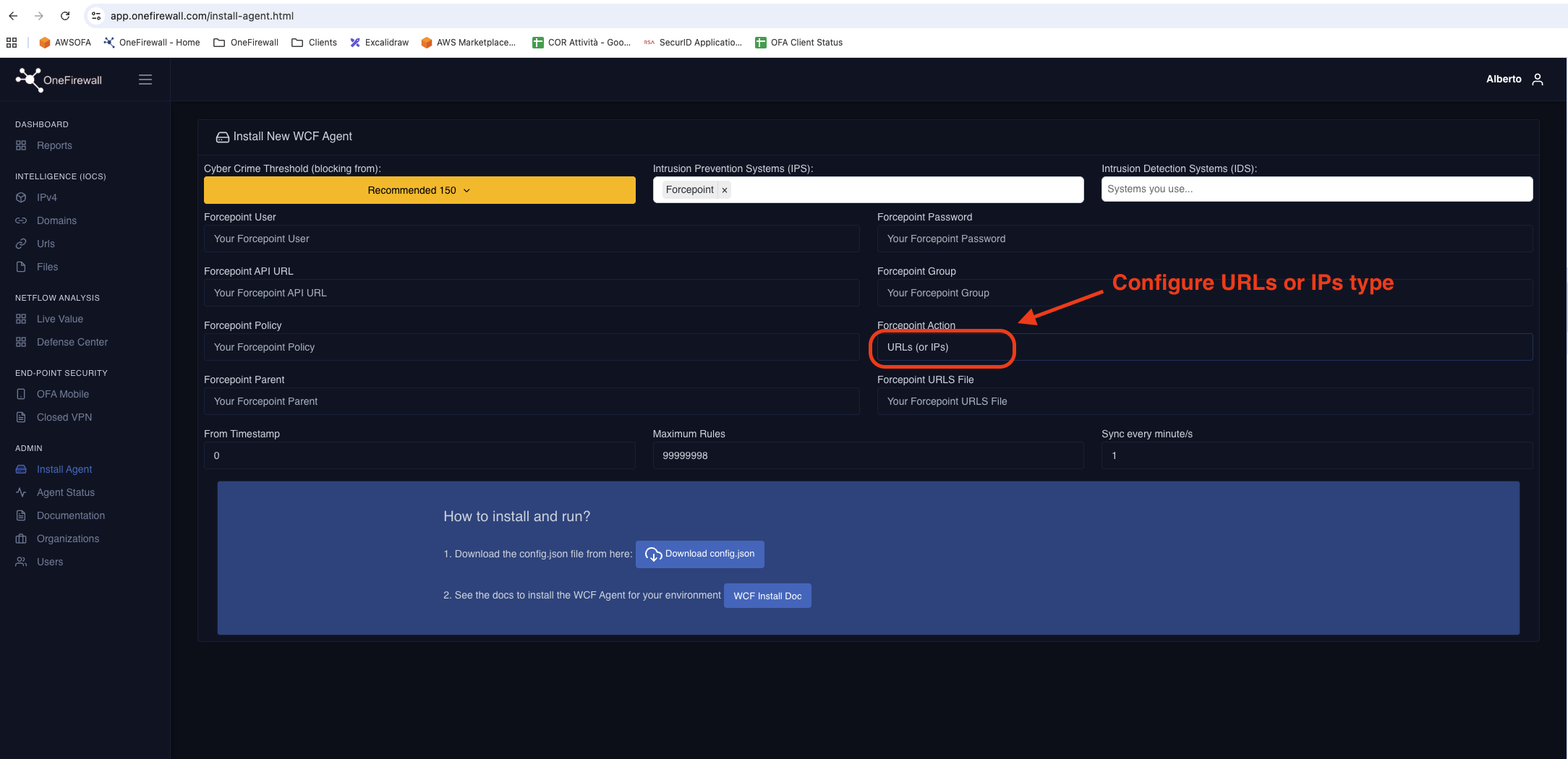
Enter your Forcepoint API credentials and policy details, then download config.json to complete the agent setup.
Configuration & CLI Reference
All WCF Agent settings are defined in a single YAML configuration file. The CLI supports on-demand sync, status checks, and log streaming.
# WCF Agent — Forcepoint NGFW target
ofa:
  api_url: "https://app.onefirewall.com/v1"
  token:   "<YOUR_OFA_API_TOKEN>"
  score_threshold: 190
  refresh_interval_sec: 300

forcepoint_ngfw:
  smc_url:  "https://smc.internal:8082"
  smc_api_key: "<SMC_API_KEY>"
  ip_group_name: "OFA_Blocklist"
  policy_name:   "Edge_Firewall_Policy"
  verify_ssl: true

agent:
  log_level: "INFO"
  log_file:  "/var/log/wcf-agent/forcepoint.log"
  dry_run:   false
# Clone and install
$ git clone https://github.com/onefirewall/wcf-agent
$ cd wcf-agent
$ python3 -m venv .venv && source .venv/bin/activate
$ pip install -r requirements.txt

# Configure and start
$ cp config/forcepoint-ngfw.example.yaml \
    /etc/wcf-agent/wcf-agent.yaml
$ systemctl enable --now wcf-agent-forcepoint

# CLI commands
$ wcf-agent status
$ wcf-agent sync --target forcepoint
$ wcf-agent logs --follow
$ wcf-agent stats
Why Use the WCF Agent with Forcepoint?
Real-Time Threat Response
Malicious IPs are blocked at the firewall within minutes of being reported by any of the 290+ OFA Alliance members — no ticket queue, no manual intervention, no delay.
Deep SMC Integration
Leverages the Forcepoint SMC REST API natively — no TFTP file drops or SSH scripting. Objects are managed as first-class SMC entities, auditable and visible in the management console.
Risk-Based Enforcement
The configurable Crime Score threshold lets your team tune the aggression of blocking. Start conservative at ≥400 and tighten down to ≥190 as confidence grows.
Automatic Expiry
OFA indicators decay over time as threat activity subsides. The agent mirrors this decay into Forcepoint — stale entries are automatically pruned from the blocklist, keeping rule-sets lean.
Full Audit Trail
Every add, update and removal action is logged with timestamp, indicator, Crime Score value, and action taken — ready for SOC review or compliance reporting.
Multi-Engine Support
A single WCF Agent instance can manage multiple Forcepoint NGFW engines managed by the same SMC, delivering consistent protection across all perimeter and internal segment firewalls.
Ready to Arm Your Forcepoint NGFW?
Deploy the WCF Agent and give your Forcepoint infrastructure real-time access to 290+ member crowd-sourced threat intelligence — automated, accurate, and always current.