Alliance Intelligence
Inside Check Point
The OneFirewall WCF Agent for Check Point pushes live Alliance threat intelligence — scored IPs, malicious domains, URLs, and file hashes — directly into your Check Point Quantum Security Gateway via SmartConsole External Indicators and EDLs.
Setup in 3 Steps
Generate JWT Token
Log into your OneFirewall Alliance dashboard → API Access → Generate JWT Token. Save the Bearer token securely — it authenticates all feed requests from Check Point to the Alliance API.
Create Indicator Feeds in SmartConsole
In Check Point SmartConsole go to Security Policies → Threat Prevention → Indicators → External Feeds. Create four new feeds — one each for IP, Domain, URL, and File Hash. Set feed type, name, API endpoint URL, and add the custom Authorization header with your JWT Bearer token. Set refresh to 5 minutes.
Define Security Policies
Use the created feeds as source or destination objects in Check Point security policies. Assign enforcement actions — Drop, Reject, or Prevent — and install the policy to your Quantum Security Gateways.
What Gets Blocked
- ● Malicious IPv4 & IPv6 addresses (scored ≥ your threshold)
- ● Malicious domain names (DNS resolution blocking)
- ● Malicious URLs (full path matching)
- ● File hashes — MD5, SHA1, SHA256
# Feed configuration per threat type

# IP Feed
Name:    OFA - IP Blocklist
URL:     https://app.onefirewall.com/api/v1/
         feed/ips?score=190&plugin=checkpoint
Header:  Authorization: Bearer <JWT_TOKEN>
Refresh: 5 minutes

# Domain Feed
Name:    OFA - Domain Blocklist
URL:     https://app.onefirewall.com/api/v1/
         feed/domains?score=190&plugin=checkpoint

# URL Feed
Name:    OFA - URL Blocklist
URL:     https://app.onefirewall.com/api/v1/
         feed/urls?score=190&plugin=checkpoint

# File Hash Feed
Name:    OFA - File Hashes
URL:     https://app.onefirewall.com/api/v1/
         feed/hashes?plugin=checkpoint

Policy action: Drop / Reject / Prevent
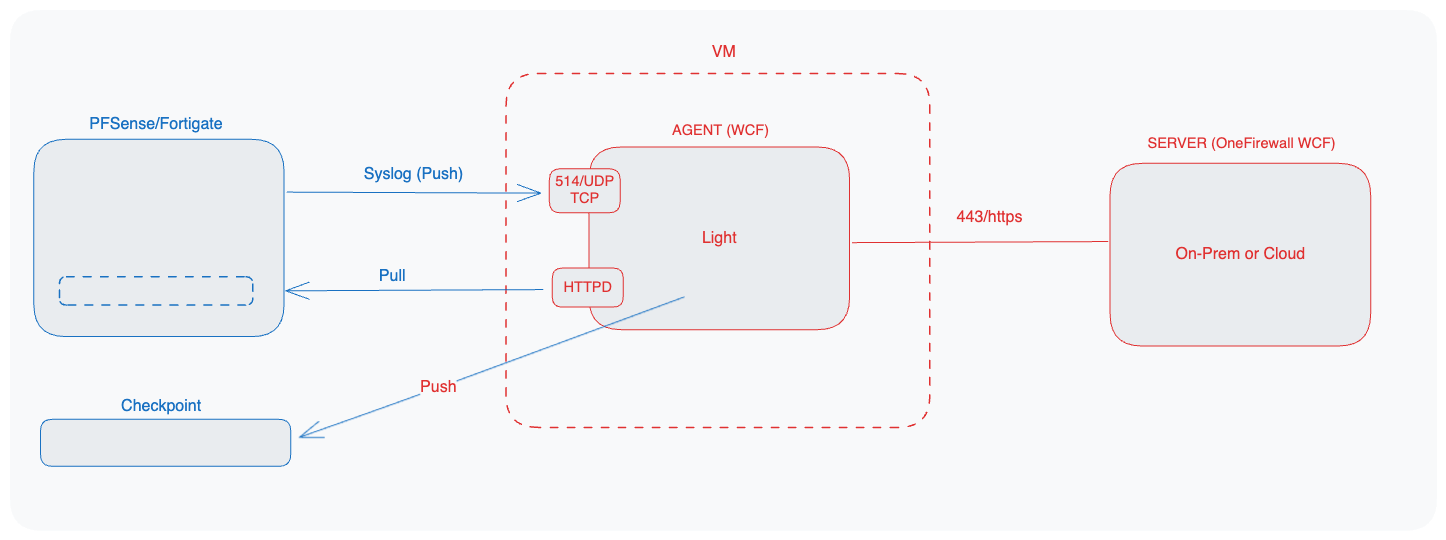
How the WCF Agent Reaches Check Point
The WCF Agent syncs the latest Alliance IoCs, then pushes them into the Check Point Secure XL module over SSH — the same underlying mechanism that powers the SmartConsole EDL feeds above.
Activate Alliance Intelligence on Check Point
Your Check Point gateways are already capable of consuming external feeds. OneFirewall Alliance provides the threat intelligence. Let us configure it together in a Proof of Value.