Feed. Defend. Detect.
All from One Agent.
The ONE-F3D Agent is your on-premises security orchestration hub — ingesting syslog from your SIEM, pushing live Alliance threat feeds to your firewalls, and detecting malicious traffic in real time, all with a 5-minute Docker deployment.
What the F3D Agent Does
Three operations, one agent. The F3D Agent eliminates the gap between threat intelligence and enforcement — automatically and continuously.
Feed — Ingest SIEM Events
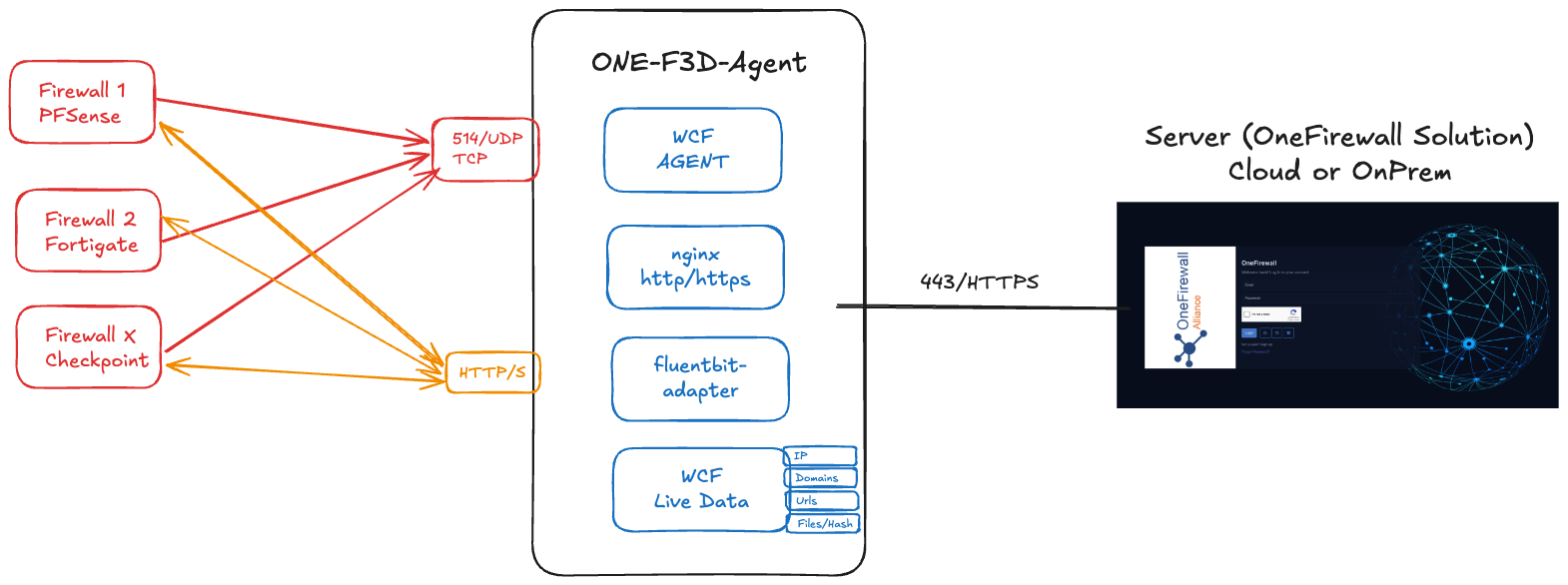
The agent listens on UDP port 514 for syslog messages from your SIEM, IDS, or network appliances. It parses, normalises, and enriches events with Alliance threat context in real time.
Defend — Push Threat Feeds to Firewalls
The agent pulls the latest Alliance threat intelligence — scored IP lists, domain blocklists, URL feeds, and file hashes — and delivers them directly to connected firewalls via HTTPS on port 8080/443.
Detect — Serve Threat Indicators
IPv4 & IPv6 addresses, domains, URLs, and file hashes are served as text file lists consumable by any network device supporting external dynamic lists (EDL). Refresh intervals are configurable.
# 1. Create deployment directory
mkdir ~/one-f3d-agent && cd ~/one-f3d-agent

# 2. Place config from OneFirewall dashboard
#    Install Agent → F3D → config.json

# 3. Launch with Docker Compose
docker compose up -d

# 4. Verify
docker compose logs -f

✔ f3d-agent   Running
✔ feed-server Running on :8080
✔ syslog-rx   Listening UDP :514
Under the Hood
Each ONE-F3D-Agent instance bundles a WCF Agent, an nginx feed server, and a fluentbit-adapter for syslog ingestion — syncing to your OneFirewall Solution server over HTTPS.
System Requirements
Minimum Hardware
- 2 vCPU
- 4 GB RAM
- 20 GB disk
- Docker + Docker Compose
Recommended Hardware
- 4 vCPU
- 8 GB RAM
- 50 GB disk
- Debian / Ubuntu LTS
Network Ports
- Inbound: UDP 514 (syslog)
- Inbound: TCP 443/8080 (feeds)
- Outbound: TCP 443 to Alliance
Deploy Your F3D Agent Today
Five minutes from zero to live threat enforcement. Talk to our team to get your config file and deploy the F3D Agent on your infrastructure.