
The firewall let 98% of the traffic in. OneFirewall's AI threat hunt found the critical campaign hiding inside it.
An organisation (name withheld) gave OneFirewall 24 hours of inbound web, WAF and proxy logs for one published service. The OneFirewall Ask AI threat hunt read every event, checked the data was fit to review, ran hunting patterns, triaged with AI, built case files and wrote ten findings. The first: a coordinated cloud campaign probing for secrets that passed with zero blocks.
Tell us which logs you collect. We'll reply with how a hunt on your data would work.
Six steps from raw logs to a findings report
Threat hunting starts from the assumption that something already got through. OneFirewall's Ask AI threat hunt applies that assumption to your logs step by step, and shows its work at every stage.
Read the data
Identify what kind of logs they are, how much was permitted, and what OneFirewall already knows about every IP involved.
Run the hunting patterns
Apply only the patterns that fit these logs: secret-file requests, admin-panel probing, exploitation payloads and more.
Check the data
Separate background traffic and verify the logs are good enough to review, from coverage of the time window to whether one source dominates.
AI triage
Decide which signals deserve a deep dive and which are noise, with a reason for every call.
Deep dives
Build a case file for each suspicious pattern: sources, timelines, requested paths, OneFirewall scores and listing history.
AI report
Correlate the evidence and write the findings: overall risk, MITRE ATT&CK techniques, recommended actions and what to hunt next.
The analysis runs in the background. Close the window and the result appears under Recent analyses when it is ready.
Want to see these six steps on your own traffic?Send us a message. A OneFirewall threat hunter will come back to you.
Book a Threat Hunt →First question: are the data good enough to hunt?
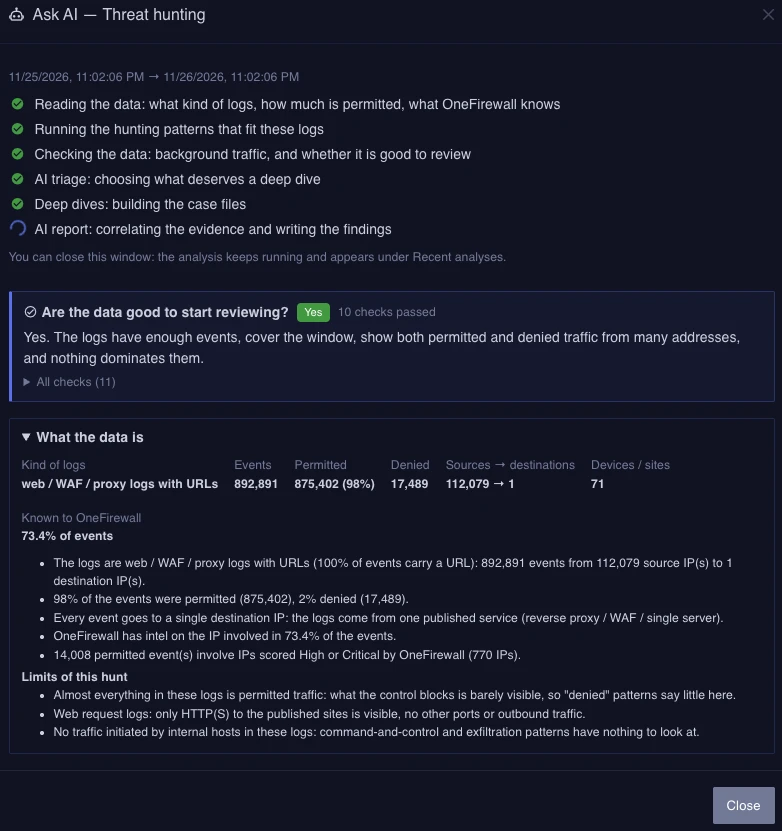
A hunt is only as good as its input, so OneFirewall checks the logs before it looks for attackers. Here the verdict was yes, 10 checks passed: enough events, the full window covered, permitted and denied traffic from many addresses, and no single source dominating.
- 892,891events, web / WAF / proxy logs with URLs
- 875,402permitted (98%), 17,489 denied
- 112,079 → 1source IPs to one published destination
- 73.4%of events involved an IP OneFirewall had intelligence on
Honest about its limits. The report also states what this hunt cannot see. With 98% permitted traffic, denied patterns say little. Only HTTP(S) to the published sites is visible. No traffic was initiated by internal hosts, so command-and-control and exfiltration patterns have nothing to look at. You know exactly how far to trust the conclusions.
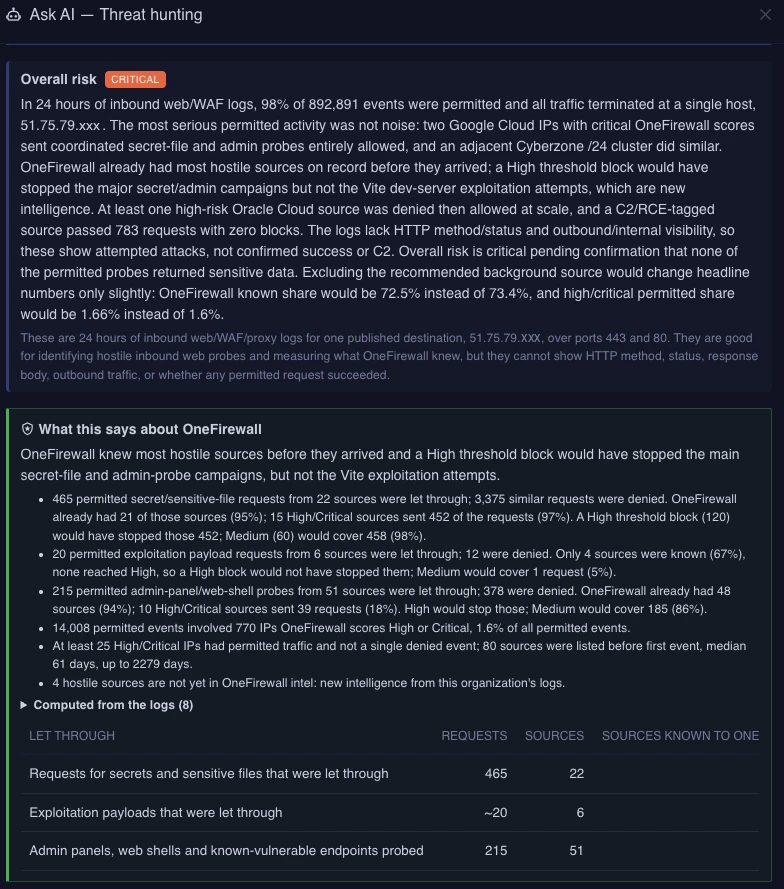
Overall risk: critical, with the reason in one paragraph
The most serious permitted activity was not noise. Two Google Cloud IPs with critical OneFirewall scores sent coordinated secret-file and admin probes that were allowed in full, and an adjacent /24 cluster did the same. A high-risk Oracle Cloud source was denied, then allowed at scale. A source tagged C2/RCE passed 783 requests with zero blocks.
| What got through | Requests | Sources | Already known |
|---|---|---|---|
| Requests for secrets and sensitive files | 465 | 22 | 21 (95%) |
| Exploitation payloads | ~20 | 6 | 4 (67%) |
| Admin panels, web shells and known-vulnerable endpoints | 215 | 51 | 48 (94%) |
The logs carried no HTTP method, status or outbound traffic, so the report labels these as attempted attacks, not confirmed compromise, and sets the next step: confirm that none of the permitted probes returned sensitive data.
OneFirewall knew most of the attackers before they arrived
Every hunt also grades OneFirewall itself: how many hostile sources were already in the intelligence, since when, and which blocking threshold would have stopped them.
95%
of the secret-file sources were already known (21 of 22). A High threshold block (score 120) would have stopped 452 of 465 requests, 97%.
94%
of the admin-panel and web-shell sources were already known (48 of 51). A Medium threshold block (score 60) would have covered 185 requests, 86%.
61 days
median time the hostile sources had been listed before their first event in these logs. The oldest had been listed for 2,279 days.
25
High or Critical IPs had permitted traffic and not a single denied event.
770
IPs scored High or Critical by OneFirewall sent 14,008 permitted events, 1.6% of all permitted traffic.
4
hostile sources were not yet in OneFirewall intelligence: new intelligence found in this organisation's own logs.
How much of your permitted traffic comes from IPs we already know?Contact us and we'll show you on your own logs.
Book a Threat Hunt →Loud is not the same as harmless
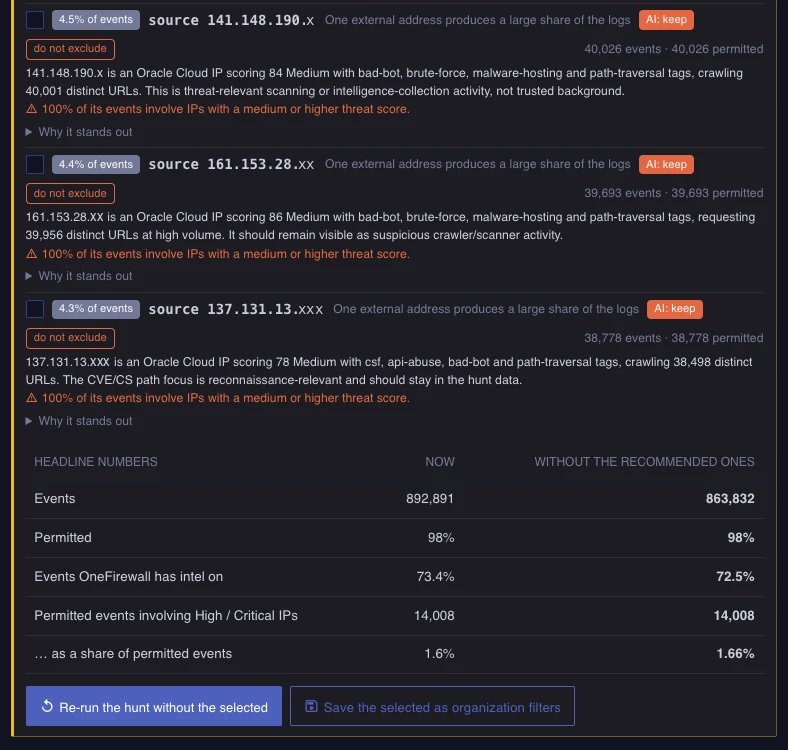
Three Oracle Cloud addresses each produced more than 4% of all events (40,026, 39,693 and 38,778, every one permitted). A naive clean-up would filter them out as background. OneFirewall's AI marked each one keep and do not exclude: scores of 78 to 86, tags for bad-bot, brute-force, malware-hosting, path-traversal and API abuse, and about 40,000 distinct URLs crawled each.
Every exclusion is transparent. The hunt shows the headline numbers with and without the recommended exclusions, then lets you re-run it or save the selection as organisation filters.
| Headline number | Now | Without exclusions |
|---|---|---|
| Events | 892,891 | 863,832 |
| Permitted | 98% | 98% |
| Events OneFirewall has intel on | 73.4% | 72.5% |
| Permitted events involving High / Critical IPs | 14,008 | 14,008 |
| … as a share of permitted events | 1.6% | 1.66% |
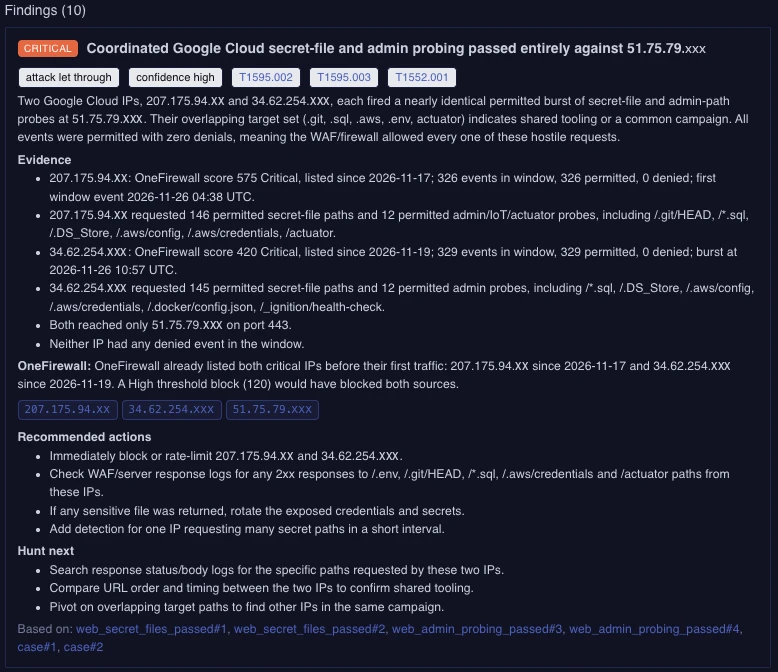
Finding 1 of 10: a coordinated secret-file campaign, let through in full
Each finding is a case file: severity, confidence, MITRE ATT&CK techniques, evidence, OneFirewall context, recommended actions and what to hunt next.
- Two Google Cloud IPs fired near-identical bursts at the same host on port 443: 326 and 329 events, every one permitted, zero denied.
- Each requested about 145 secret-file paths and 12 admin probes, including
/.git/HEAD,*.sql,/.DS_Store,/.aws/config,/.aws/credentials,/.docker/config.jsonand/actuator. - The overlapping target set points to shared tooling or a single campaign.
Both IPs were already listed with Critical scores of 575 and 420, since 17 and 19 November: days before their first request on 26 November. A High threshold block (120) would have stopped both.
- Block or rate-limit both sources immediately.
- Check WAF and server response logs for any 2xx responses to
/.env,/.git/HEAD,*.sql,/.aws/credentialsand/actuator. - If any sensitive file was returned, rotate the exposed credentials and secrets.
- Add a detection for one IP requesting many secret paths in a short interval.
- Search response status and body logs for the paths these two IPs requested.
- Compare URL order and timing between the two IPs to confirm shared tooling.
- Pivot on the overlapping paths to find other IPs in the same campaign.
Nine more findings came out of the same 24 hours.What would a hunt find in yours? Let's talk.
Book a Threat Hunt →The risk lives in what the firewall allowed
- 98% of these events were permitted. What the firewall blocks is barely visible here. What it let in is where the attackers were.
- The worst sources looked like ordinary visitors. Valid HTTPS on port 443, no denials, no alerts: the probes for cloud credentials blended in.
- Intelligence covers most of it. Hunting finds the rest. Most hostile sources were already known, but the hunt also surfaced 4 new ones and the Vite exploitation attempts no threshold would have caught.
What a OneFirewall threat hunt hands your team
Data readiness verdict
Whether your logs are fit to hunt, with every check listed and the limits of what they can show.
Overall risk in plain language
One paragraph a CISO can read and an analyst can act on.
An honest grade for your intelligence
What OneFirewall already knew, since when, and which blocking threshold would have stopped each campaign.
Findings mapped to MITRE ATT&CK
Each with severity, confidence, evidence and the OneFirewall context behind it.
Actions and next hunts
Concrete blocks, checks and detections, plus the pivots to run next.
Transparent noise handling
Recommended exclusions with before-and-after numbers. Re-run the hunt or save them as organisation filters.
Threat hunting questions
What logs can OneFirewall hunt in?
The hunt starts by identifying the kind of logs it was given. This case used web, WAF and proxy logs with URLs. Firewall and network logs add visibility on other ports and on outbound traffic, which this hunt explicitly lacked. Contact us with what you collect and we will tell you what a hunt can see.
Does a critical finding mean we were breached?
Not on its own. The hunt separates attempted attacks from confirmed success and says which evidence is missing, in this case response status and body logs. The recommended actions tell you exactly what to check.
How does threat hunting relate to OneFirewall blocking?
Blocking with alliance intelligence stops known hostile sources at the edge. Threat hunting measures how well that works on your real traffic, shows which threshold fits you and finds what the intelligence has not seen yet.
How do we start?
Contact us. Tell us which logs you collect and the time window you care about, and we will set up a hunt on your data.
Want this threat hunt on your logs?