Threat Intelligence
for Any AI Agent
The OneFirewall MCP Server is a read-only data consumption channel for the World Crime Feed (WCF) platform. It lets Claude, GPT-4, GitHub Copilot, and any MCP-compatible agent query OneFirewall's threat intelligence directly — investigate IPs, pull live blocklists, report malicious actors, and check your firewall fleet status. No data is shared with any AI provider.
WCF Data Consumption via AI Agents
The Model Context Protocol (MCP) is an open standard that lets AI models call external tools over a secure, structured interface. The OneFirewall MCP Server uses MCP to expose the World Crime Feed (WCF) platform as a set of callable tools — allowing your AI agent to query threat intelligence directly, without you ever leaving the conversation.
Without MCP, a SOC analyst manually copies an IP from a SIEM alert, opens the OneFirewall dashboard, runs the lookup, copies the result, pastes it into their AI chat, then repeats for every follow-up. With MCP, the AI agent does all of that in one step — the analyst asks a natural language question and the agent calls get_ip_intel("XX.XX.XX.XX") automatically, receiving the complete WCF CTI profile in its context window.
The OneFirewall MCP server is hosted and managed — no self-hosting required. Connect via https://mcp.onefirewall.com/mcp with your JWT token and your AI client will immediately see all available tools in its tools panel.
This is a read-only, one-way data consumption channel. WCF threat intelligence is fetched from OneFirewall's infrastructure and delivered into your AI agent's local context window only. No threat data, IP records, or Alliance intelligence is transmitted to or stored by any AI provider. Your AI client receives the data and uses it to answer your question — it never sends it upstream.
How a tool call works
# 1. User prompt (natural language)
User: "What does OneFirewall know about XX.XX.XX.XX?"

# 2. AI selects and calls the matching MCP tool
tool_call: get_ip_intel
params: { "ipv4": "XX.XX.XX.XX" }

# 3. MCP server authenticates with your JWT,
#    queries the Alliance CTI API, returns JSON
response: {
  "crime_score": 847,
  "verdict": "MALICIOUS",
  "asn": "AS4766",
  "geo": "DE",
  "mitre_techniques": ["T1110", "T1595"],
  "stix_bundle": { /* full STIX 2.1 */ },
  "member_reports": 34,
  "total_sightings": 1284
}

# 4. AI synthesises response in natural language
✔ Crime Score 847 — block immediately.
✔ Tor exit node, 34 members reporting brute-force.
AI-Driven CTI: Live Investigation
The following screenshots show an actual WCF investigation session using Claude Desktop with the OneFirewall MCP Server enabled. No dashboards were opened. All threat intelligence was fetched from the WCF platform by the AI agent via tool calls — the AI acted as a consumer of OneFirewall data, not a source.
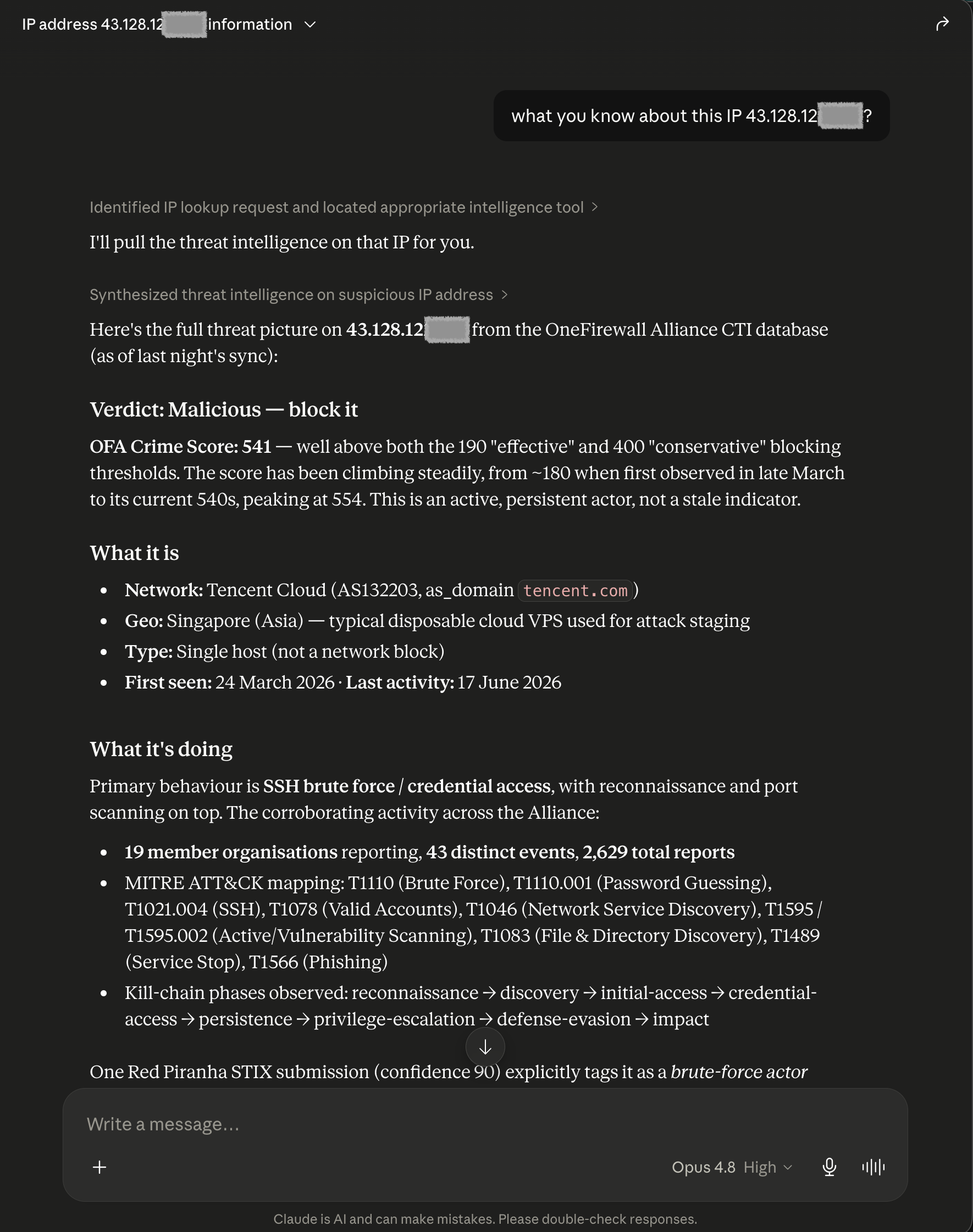
get_ip_intelThe analyst asks about a suspicious IP flagged in their SIEM. Claude calls
get_ip_intel and the WCF platform returns the complete CTI profile: Crime Score 541, hosted on AS132203 (Tencent Cloud, Singapore), 19 Alliance members reporting, 43 distinct events across 2,629 total sightings. MITRE ATT&CK mapping includes T1110 (Brute Force), T1110.001 (Password Guessing), T1021.006 (SSH), T1046 (Network Service Discovery), T1595.002 (Active Vulnerability Scanning), and T1566 (Phishing). Kill-chain: reconnaissance → credential-access → privilege-escalation → defense-evasion → impact. The AI consumed this data — no intelligence was sent to any AI provider.
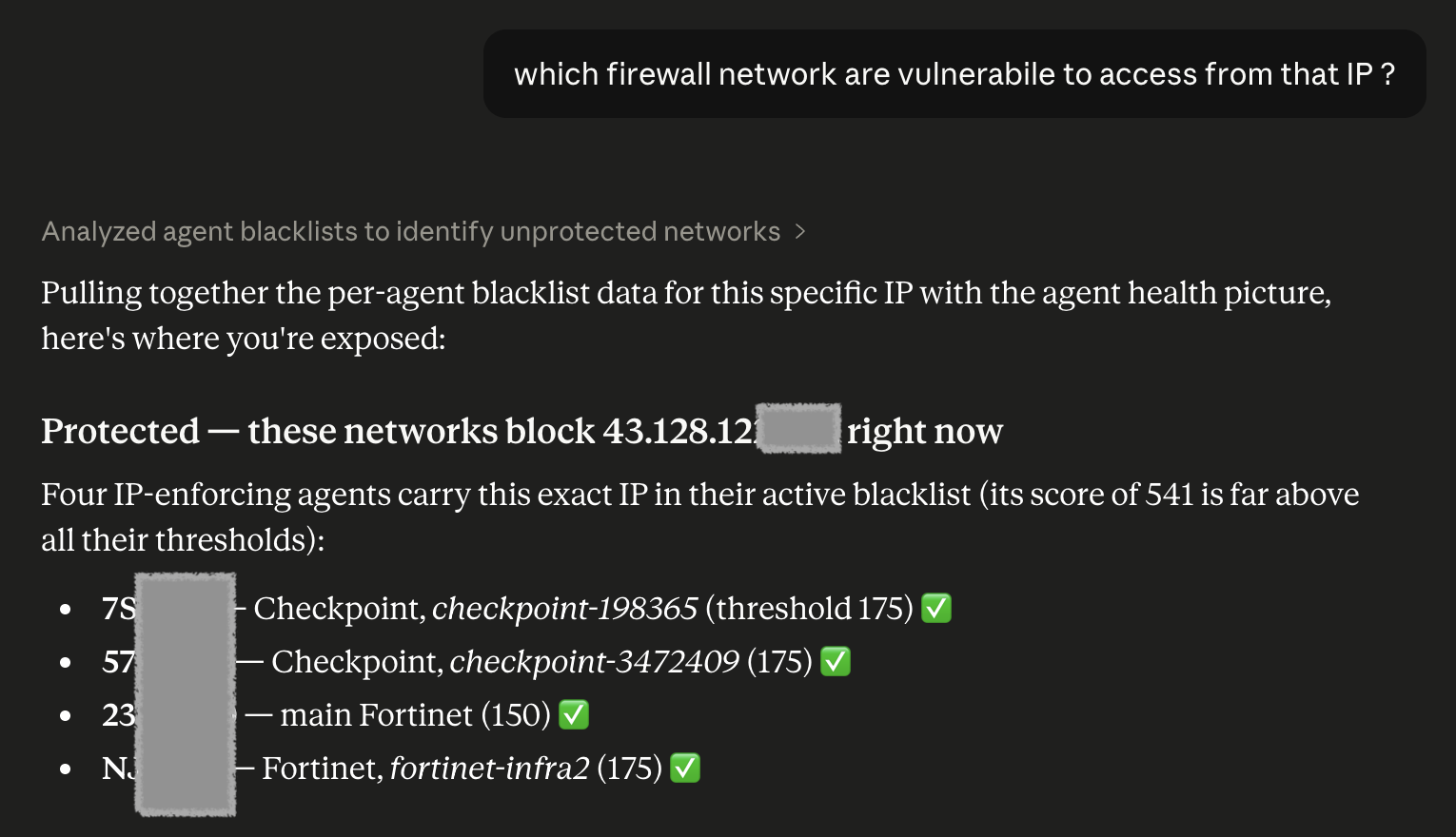
get_agent_statusWithout switching tools, the analyst follows up: "Which firewall networks are vulnerable?" Claude calls
get_agent_status to pull WCF agent data — the per-agent blocklist and configured Crime Score threshold for the organisation. It cross-references the IP's score against each agent's threshold and reports which Checkpoint and Fortinet nodes are actively blocking (score exceeds their threshold of 175) and which remain exposed. All data comes from the WCF platform; nothing is sent back to the AI provider.
get_ip_intel and get_agent_status — were triggered automatically by the AI. WCF data flows strictly from OneFirewall into the agent's context window. The AI provider (Anthropic, OpenAI, etc.) receives the tool response as structured data in the conversation — it does not store, index, or retransmit it to any third party. Your threat intelligence stays yours.
Complete investigation timeline
# T+0s — Alert fires in SIEM
⚠  SSH brute-force from XX.XX.XX.XX → XX.XX.XX.XX

# T+12s — Analyst asks Claude
User: "What does OneFirewall know about XX.XX.XX.XX?"
→ tool_call: get_ip_intel({ ipv4: "XX.XX.XX.XX" })
✔ Crime Score 541, Singapore/Tencent, 2629 sightings

# T+28s — Analyst asks follow-up
User: "Which of my networks are still exposed?"
→ tool_call: get_agent_status()
✔ 4 agents enforce score > 175 → IP blocked
✗ 2 agents threshold > 600 → NOT blocked yet

# T+35s — Analyst submits report
User: "Report it, confidence 0.95, source sshlog"
→ tool_call: report_ip({
    ip: "XX.XX.XX.XX",
    confidence: 0.95,
    source: "sshlog",
    notes: "SSH brute-force, 43 events observed"
  })
✔ Submitted to Alliance — score update propagating
AI-Augmented SOC: A Technical Walkthrough
The following shows how a modern CTI analyst uses the OneFirewall MCP Server to consume WCF data through their AI system — compressing a multi-dashboard investigation normally taking 20–40 minutes into a single conversation thread under 60 seconds. The AI acts purely as a consumer and interpreter of WCF data; no intelligence leaves OneFirewall's infrastructure.
SIEM Alert → Natural Language WCF Query
A SIEM rule fires on repeated SSH login failures from an unknown external IP. Instead of pivoting to three separate dashboards, the analyst asks their AI agent: "What does the OneFirewall WCF platform know about this address?" The AI recognises the intent and calls get_ip_intel to fetch the data.
Full WCF CTI Profile Delivered to Agent Context
The MCP server fetches the complete WCF profile from OneFirewall's infrastructure and delivers it into the agent's context window: Crime Score (1–1000), ASN and geolocation, first-seen and last-seen timestamps, MITRE ATT&CK technique mappings, STIX 2.1 bundle, Alliance member report count, and total sighting count. The AI synthesises this into a verdict — consuming the data, not generating it.
Firewall Exposure Analysis
The analyst follows up: "Which of my firewall agents are not blocking this IP?" The AI calls get_agent_status, retrieves each WCF Agent's configured Crime Score threshold and active blocklist, and returns a per-device table showing which nodes enforce a score threshold low enough to block the IP and which remain exposed.
Alliance Contribution via report_ip
The analyst instructs the AI to report the IP to the Alliance with a confidence score, source identifier (e.g., "sshlog"), and optional free-text notes. The report_ip tool submits the indicator, incrementing the collective Crime Score and notifying all 290+ member organisations within the Alliance's <200ms propagation window.
Live WCF Feed Pull for Bulk Ingestion
When enriching a SOAR playbook or pre-seeding a new firewall policy, the analyst asks for a bulk blocklist: "Give me all IPs with a Crime Score above 500 in CSV format." The get_live_ipv4_feeds tool returns a paginated, enforcement-ready feed directly from the live WCF database — with optional score columns for threshold-based ACL generation. The AI acts as a conduit; the data originates from and remains owned by OneFirewall.
Full JSON response from get_ip_intel
{
  "ipv4": "XX.XX.XX.XX",
  "crime_score": 847,
  "verdict": "MALICIOUS",
  "asn": "AS4134",
  "asn_name": "CHINANET-BACKBONE",
  "geo": { "country": "CN", "city": "Shenzhen" },
  "type": "single_host",
  "first_seen": "2024-11-03T08:12:00Z",
  "last_activity": "2026-06-21T23:47:00Z",
  "member_reports": 34,
  "total_sightings": 1284,
  "mitre_techniques": [
    { "id": "T1110",   "name": "Brute Force" },
    { "id": "T1110.001","name": "Password Guessing" },
    { "id": "T1021.006","name": "SSH" },
    { "id": "T1046",   "name": "Network Service Scan" },
    { "id": "T1595.002","name": "Vulnerability Scanning" }
  ],
  "kill_chain": [
    "reconnaissance", "discovery",
    "initial-access", "credential-access",
    "persistence", "privilege-escalation"
  ],
  "stix_bundle": {
    "type": "bundle",
    "spec_version": "2.1",
    "objects": [ /* indicator, attack-pattern, ... */ ]
  }
}
# Prompt: "Give me IPs with Crime Score > 500 in CSV"
→ tool_call: get_live_ipv4_feeds({
    min_score: 500,
    format: "CSV",
    show_score: "yes"
  })

# Response (enforcement-ready):
XX.XX.XX.XX,847
XX.XX.XX.XX,802
XX.XX.XX.XX,791
XX.XX.XX.XX,778
XX.XX.XX.XX,763
# ... paginated via next_page header
Tool Reference
Four production-ready tools, each callable by any MCP-compatible AI agent. The AI selects the correct tool automatically based on the analyst's natural language prompt.
Full CTI profile for any IPv4 address — Crime Score, MITRE ATT&CK mappings, STIX 2.1 bundle, Alliance member reports, agent observations, ASN, geolocation, first/last seen timestamps, and kill-chain phases.
| Parameter | Type | Required | Description |
|---|---|---|---|
ipv4 | string | Yes | IPv4 address to investigate (e.g. "XX.XX.XX.XX") |
Paginated real-time blocklist of all Alliance-tracked malicious IPs above a configurable Crime Score threshold. Output is enforcement-ready for firewall ACLs, IPS external dynamic lists, and SOAR playbooks.
| Parameter | Type | Required | Description |
|---|---|---|---|
min_score | integer | Yes | Minimum Crime Score (1–1000). 500+ for high-confidence automated blocking. |
format | string | No | CSV or LIST. Defaults to CSV. |
show_score | string | No | "yes" to append score column to each IP. |
page | string | No | Pagination cursor from next_page response header. |
agid | string | No | Scope results to a specific WCF Agent ID. |
plugin | string | No | Filter by IPS plugin name (e.g. "fortigate"). |
Submit a threat indicator to the OneFirewall Alliance. Contributions from 290+ member organisations are aggregated into the collective Crime Score, updating across the Alliance within <200ms. Supports optional decision overrides (whitelist/blacklist) with TTL expiry.
| Parameter | Type | Required | Description |
|---|---|---|---|
ip | string | Yes | IPv4 address or CIDR block to report. |
confidence | float | Yes | 0.0 (uncertain) to 1.0 (certain). Use 0.9+ for directly observed attacks. |
source | string | Yes | Where the threat was observed: "sshlog", "ids", "waf", etc. |
notes | string | No | Free-text description of observed behaviour. |
decision | integer | No | -1 score-based (default), 0 whitelist, 1 force blacklist. |
ttl | integer | No | Unix timestamp for decision override expiry. |
Retrieve live status for WCF firewall agents registered in your organisation: Crime Score threshold, sync interval, max rule count, last sync timestamp, active blocklist size, plugin name, and any error codes. Critical for cross-referencing IP findings against agent enforcement posture.
| Parameter | Type | Required | Description |
|---|---|---|---|
agid | string | No | Agent ID to filter to a single agent. Omit to return all agents in your org. |
Connect in Under 2 Minutes
Get your JWT token from the OneFirewall dashboard, paste it into the configuration below, and restart your AI client. The OneFirewall tools appear automatically.
Edit claude_desktop_config.json — macOS: ~/Library/Application Support/Claude/claude_desktop_config.json — Windows: %APPDATA%\Claude\claude_desktop_config.json
{
  "mcpServers": {
    "onefirewall": {
      "command": "npx",
      "args": [
        "-y", "mcp-remote",
        "https://mcp.onefirewall.com/mcp",
        "--header", "Authorization: Bearer YOUR_JWT_TOKEN"
      ]
    }
  }
}
Restart Claude Desktop. The OneFirewall tools appear in the tools panel (hammer icon) on the next session.
Open Cursor Settings → MCP and add a new server, or edit .cursor/mcp.json in your project root:
{
  "mcpServers": {
    "onefirewall": {
      "command": "npx",
      "args": [
        "-y", "mcp-remote",
        "https://mcp.onefirewall.com/mcp",
        "--header", "Authorization: Bearer YOUR_JWT_TOKEN"
      ]
    }
  }
}
Tools are available automatically in Cursor's Agent mode. No restart needed after the first connection.
Add to your VS Code settings.json. Enable GitHub Copilot Agent mode for tools to activate.
{
  "mcp": {
    "servers": {
      "onefirewall": {
        "type": "http",
        "url": "https://mcp.onefirewall.com/mcp",
        "headers": {
          "Authorization": "Bearer YOUR_JWT_TOKEN"
        }
      }
    }
  }
}
Edit ~/.codeium/windsurf/mcp_config.json and reload Windsurf. Tools are available in Cascade (Agent mode).
{
  "mcpServers": {
    "onefirewall": {
      "command": "npx",
      "args": [
        "-y", "mcp-remote",
        "https://mcp.onefirewall.com/mcp",
        "--header", "Authorization: Bearer YOUR_JWT_TOKEN"
      ]
    }
  }
}
Run once to register the server globally. The tools are then available in every Claude Code session without further configuration.
# Register globally (once)
claude mcp add --transport http onefirewall \
  https://mcp.onefirewall.com/mcp \
  --header "Authorization: Bearer YOUR_JWT_TOKEN"

# Verify registration
claude mcp list
✔ onefirewall  https://mcp.onefirewall.com/mcp

# Tools available in every session:
#   get_ip_intel · get_live_ipv4_feeds
#   report_ip · get_agent_status
Add to ~/.config/opencode/config.json. Available on next session start.
{
  "mcp": {
    "onefirewall": {
      "type": "remote",
      "url": "https://mcp.onefirewall.com/mcp",
      "headers": {
        "Authorization": "Bearer YOUR_JWT_TOKEN"
      }
    }
  }
}Consume WCF Data Through Your AI Agent
Your JWT token is in the OneFirewall dashboard under Install Agent → MCP. Paste it into your AI client configuration and your agent will have direct, read-only access to the World Crime Feed platform — live threat intelligence as a built-in capability, with no data shared with any AI provider.
Not yet a member? Contact us to arrange a Proof of Value.